Gallery
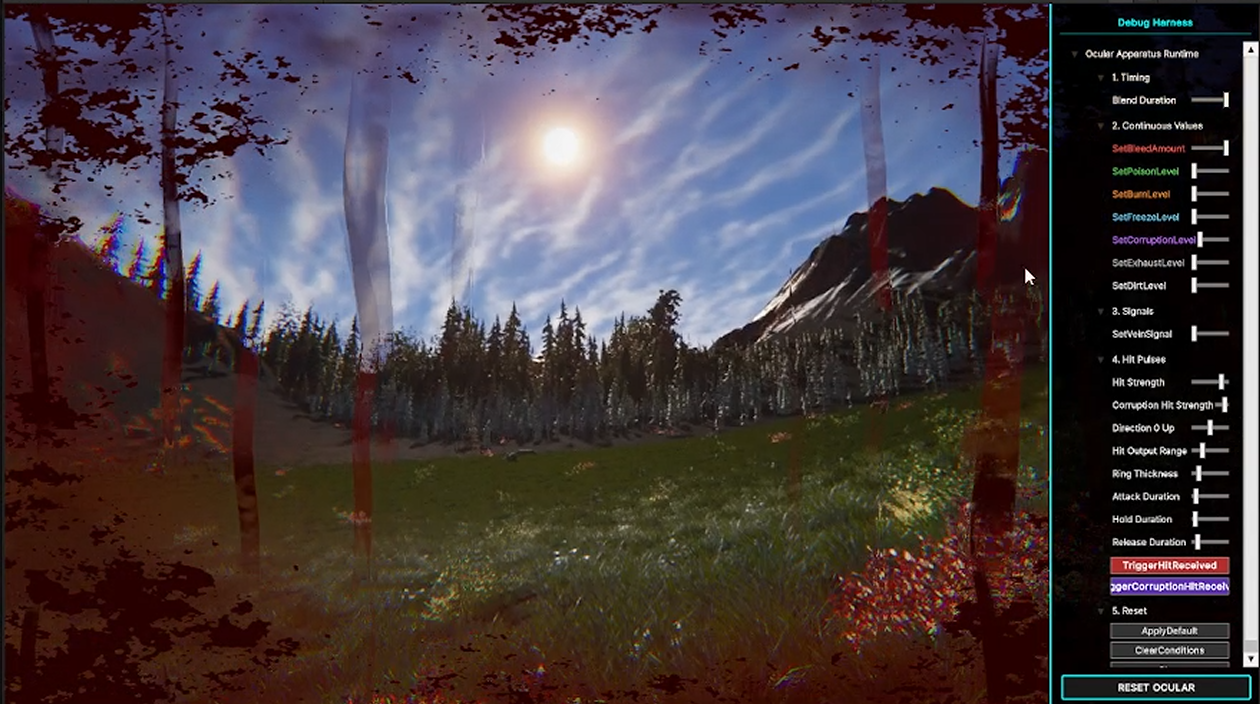
A technical art post-mortem on turning a broad set of first-person status-overlay ideas into a usable HDRP Ocular Apparatus system: one shared shader stack, packed mask channels, ScriptableObject presets, and a gameplay-facing API.
This post is not mainly about one isolated shader trick. It is about how a rough visual direction became a usable first-person screen-surface system.
The original request was broad: the player camera needed to feel physically affected by damage, bleeding, exhaustion, corruption, and other possible status effects. These could not read like ordinary HUD overlays. They needed to feel like something was happening on the eye surface or camera lens: pressure at the edge of vision, blood obstructing the view, local liquid distortion, darkening, pulse masks, and color pressure.
At the sketch stage, it would have been easy to create one overlay, one material, or one post-process for every effect. That would have been fast for a single screenshot, but fragile as a system. Every extra fullscreen post-process pass means another draw call and another screen-buffer operation. Every extra overlay also creates another control path to debug.
The core decision was therefore simple:
Instead of adding a new fullscreen pass for every player status effect, build one reusable Ocular Apparatus shader stack and let multiple effects share the same screen-space infrastructure.
I first described the system as three buckets. This was useful because it separated visual behavior by rendering function rather than by gameplay status name.
flowchart TD
    A["Player Status Input"] --> B["Shared Screen Field"]

    B --> C["Bucket A: Distortion<br/>UV-space motion"]
    B --> D["Bucket B: Surface Overlay<br/>alpha / physical obstruction"]
    B --> E["Bucket C: Color<br/>luma, tint, ramp response"]

    C --> F["Local liquid offset<br/>hit ripple<br/>flow distortion"]
    D --> G["blood masks<br/>streaks<br/>drips<br/>pressure shapes"]
    E --> H["tone shift<br/>darkening<br/>color injection"]

    F --> I["Final Ocular Composite"]
    G --> I
    H --> I
This made the early design easier to reason about:
The important part is that these buckets are not separate post-processes. They are conceptual layers inside one shader stack.
The decision to build an UberShader was not about making the graph large for its own sake. It was a performance and ownership decision.
If hit feedback, bleeding, exhaustion, poison, corruption ripple, wipe smear, frost, and other effects were implemented as separate fullscreen passes, the system would grow by duplication:
flowchart LR
    A["Effect 01"] --> A1["fullscreen pass"]
    B["Effect 02"] --> B1["fullscreen pass"]
    C["Effect 03"] --> C1["fullscreen pass"]
    D["Effect 04"] --> D1["fullscreen pass"]
    E["More effects"] --> E1["more passes"]

    A1 --> F["repeated screen reads / writes"]
    B1 --> F
    C1 --> F
    D1 --> F
    E1 --> F
For a first-person screen effect system, that is a bad long-term trade. Most of these effects need the same data: screen UV, radial falloff, edge masks, flow UVs, noise, distortion vectors, and a final composite.
The other reason was texture data. Many overlay masks are grayscale data. A blood body mask, a clot mask, a drip mask, and a vein mask do not each need a full RGBA texture. One packed RGBA texture can carry four independent mask channels.
flowchart TD
    A["One Packed RGBA Texture"] --> R["R channel<br/>primary mask"]
    A --> G["G channel<br/>secondary mask"]
    A --> B["B channel<br/>detail mask"]
    A --> AA["A channel<br/>drip / dark mask"]

    R --> S["UberShader"]
    G --> S
    B --> S
    AA --> S

    S --> O["four visual genes from one image asset"]
The larger idea was a 12-channel dictionary: three packed RGBA textures could provide twelve reusable visual genes. The final demo did not need all twelve effects, but the data strategy shaped the graph correctly. Effects could be cut without collapsing the underlying pipeline.
The early plan was closer to a game-wide visual reaction framework. It included many possible overlay slots and future status effects. That was useful for planning, but too large for a demo milestone.
The production version had to answer a smaller question:
Which parts must actually work, be tunable, and be handoff-ready?
The answer became three primary slots:
This was the first major upgrade from sketch to usable system. I stopped treating the graph as a place to hold every imagined effect and started treating it as a controlled runtime stack for the effects that had to ship.
Several early solutions worked visually but were not maintainable.
One temporary script read sun and moon color, calculated tone color, and wrote shader globals every frame. That was useful for proving the look, but it owned too many responsibilities at once: it read scene lighting, decided tone logic, and wrote global shader state.
That pattern does not scale. If multiple scripts write shader globals, the final image depends on update order and hidden state. It also makes handoff difficult because programmers cannot tell which component owns the effect.
The usable version moved toward explicit references and a public API:
flowchart TD
    A["Gameplay / Debug Input"] --> B["Public API<br/>OcularApparatusController"]
    B --> C["Runtime State"]
    D["ScriptableObject Presets"] --> C

    C --> E["Composition Layer<br/>combine active effects"]
    E --> F["Material / Volume Binding"]
    F --> G["HDRP Custom Post Process"]
    G --> H["SG_SS_OcularApparatus<br/>master shader graph"]
The controller became the place where gameplay-facing calls are exposed, while the graph stayed focused on visual composition. Presets became the place for tuning values. Material references replaced broad global injection where possible.
That was the second major upgrade: the system stopped being a collection of debug scripts and became a controllable visual endpoint.
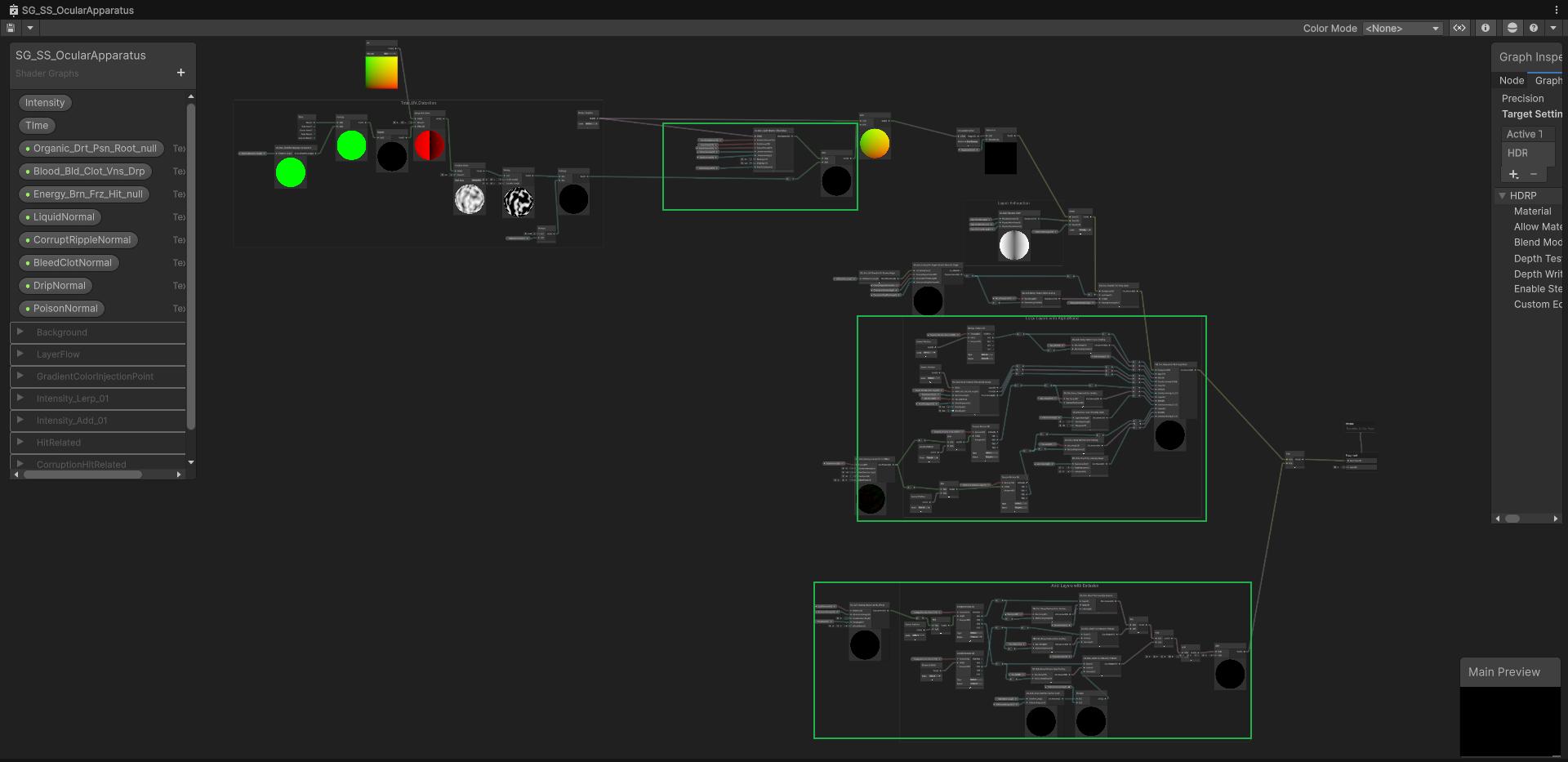
The final shader graph can be understood as three large structures.
The master graph is organized around three major structures: liquid normal / UV distortion, Lerp-based physical overlay, and Add-based color injection.
flowchart TD
    A["Screen UV / Camera Buffer"] --> B["Liquid Normal Offset Mixer"]
    B --> C["Distorted Screen Sample"]

    C --> D["Layers with Lerp<br/>physical obstruction"]
    D --> E["Layers with Add<br/>color / intensity injection"]
    E --> F["Final Ocular Output"]

    G["Packed Mask Channels"] --> D
    H["Normal Textures"] --> B
    I["Ramp Textures"] --> E
    J["Runtime Intensities"] --> B
    J --> D
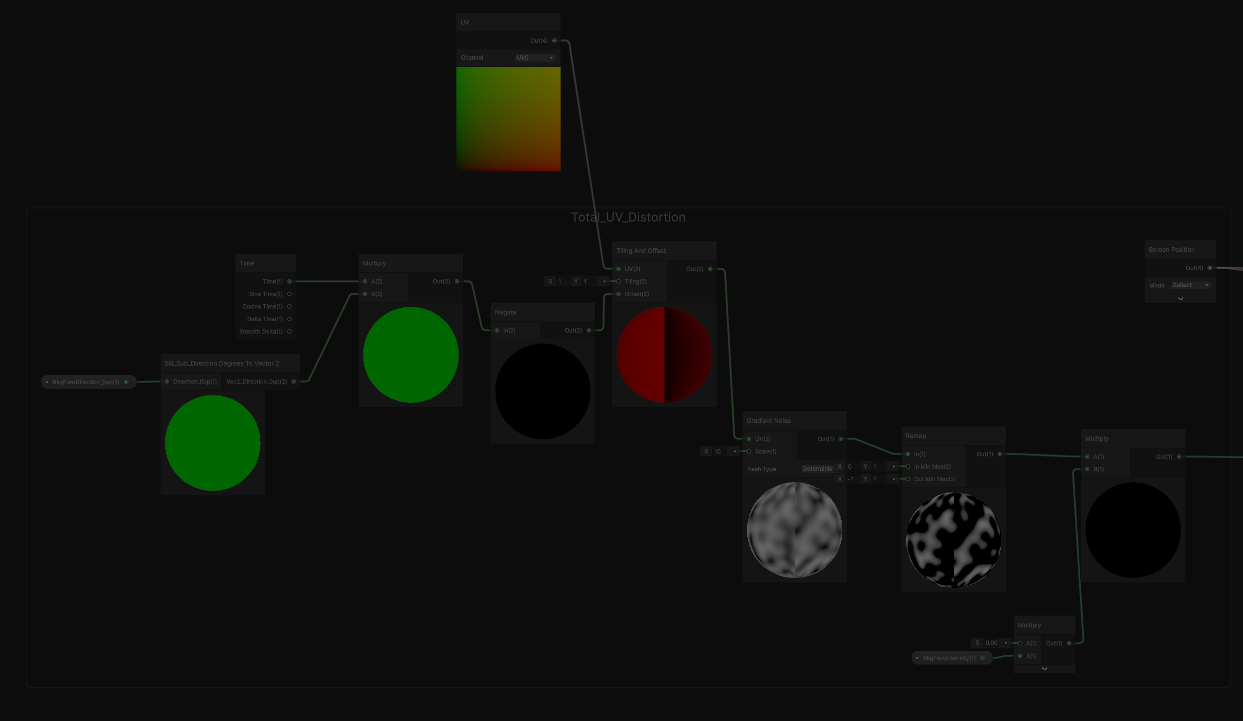
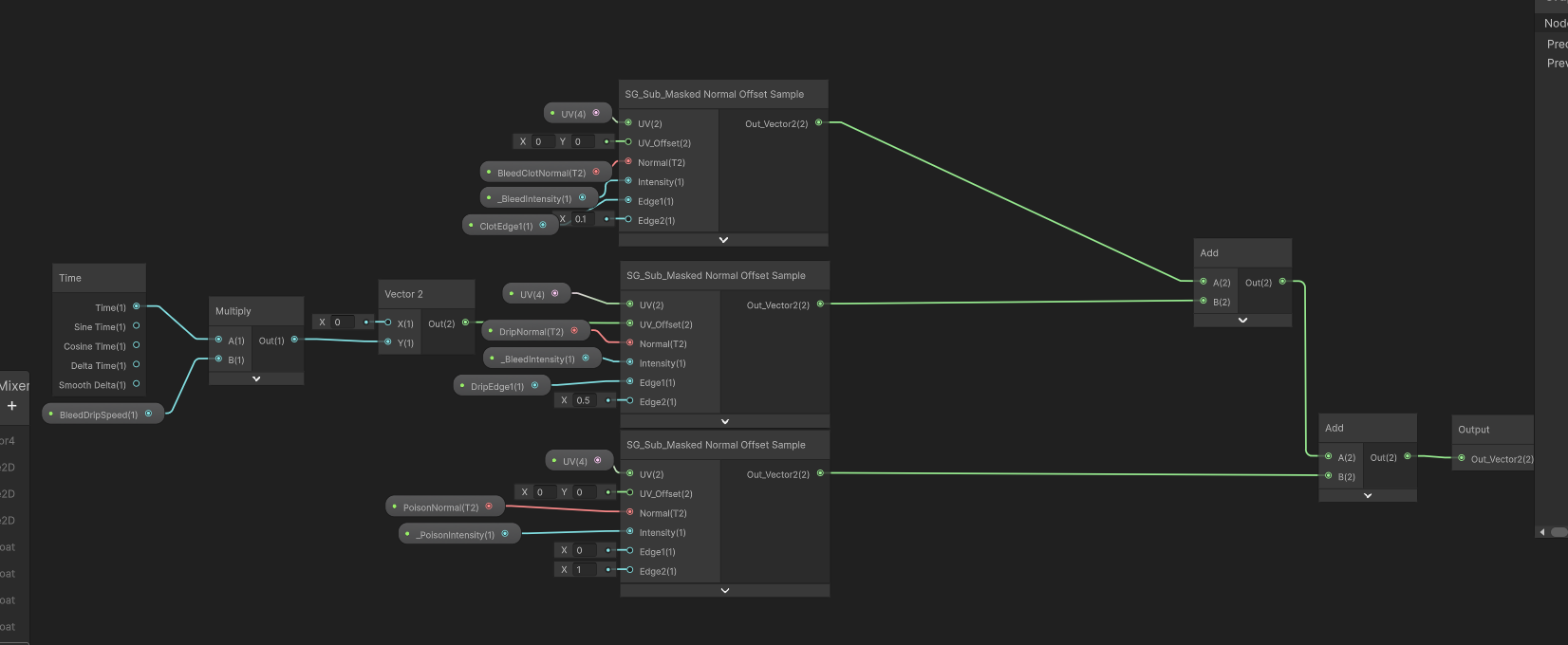
J --> EThis section builds local UV offsets from liquid and ripple normal data. It is responsible for making surface effects feel attached to a wet or damaged eye surface instead of sitting as flat UI stickers.
Step 1: establishing the shared UV distortion field before later samples read the screen and overlay textures.
The important lesson here was that distortion must be part of the shared sampling path. If only the background is distorted while blood masks sample the original UVs, the world moves but the blood behaves like a static decal. The final graph routes the distortion logic into the relevant texture sampling path so the overlay and the camera buffer feel connected.
Liquid Normal Offset Mixer: multiple masked normal sources are accumulated into a reusable screen-space offset.
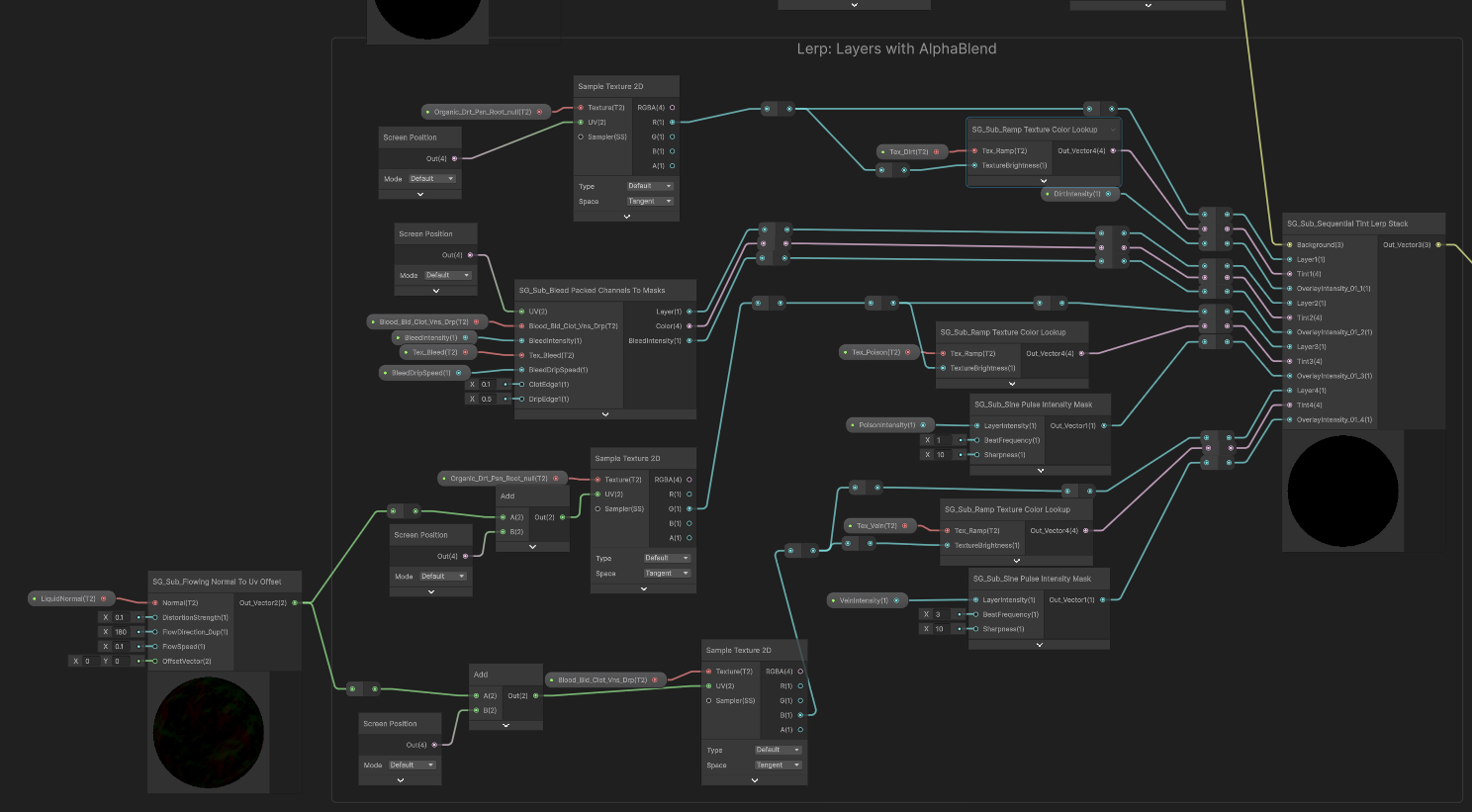
This section handles physical obstruction. Blood, dark masses, streaks, drips, and pressure masks should not simply add brightness on top of the image. They partially replace or darken the underlying screen color.
Layers with Lerp: physical obstruction layers are composited as ordered replacements over the screen color.
That is why these layers use ordered Lerp behavior. The shader treats them more like material stuck in front of the camera than like light being added.
flowchart LR
    A["Camera Color"] --> B["Lerp blood body"]
    B --> C["Lerp clot / dark mass"]
    C --> D["Lerp streak / vein detail"]
    D --> E["Lerp drip / edge pressure"]
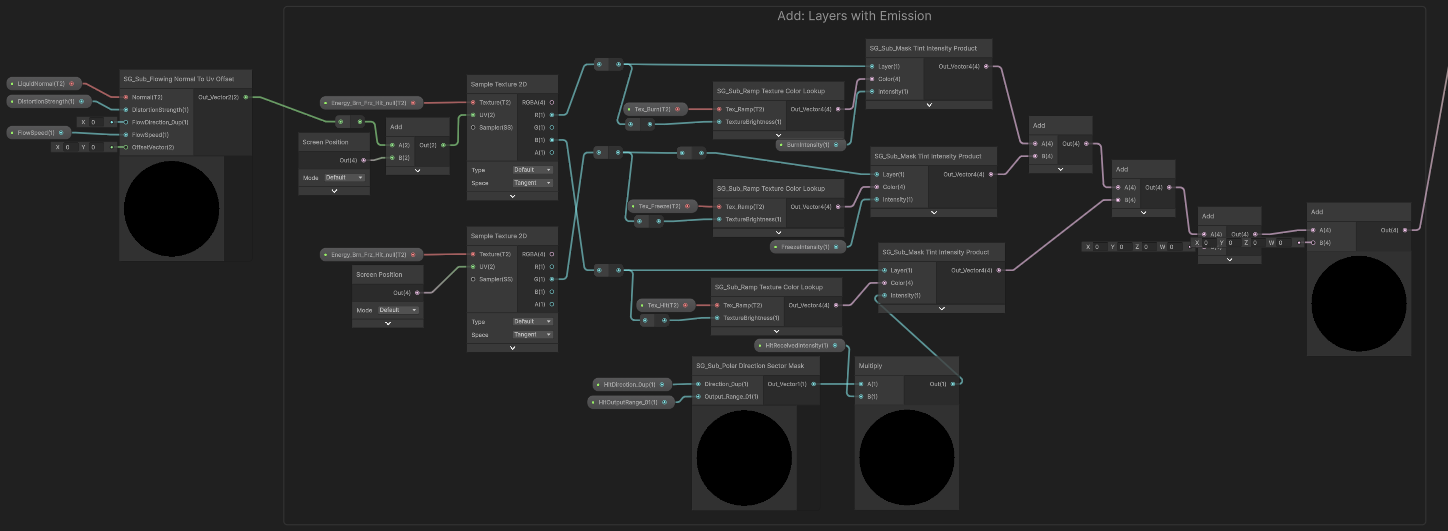
E --> F["Obstructed Surface Result"]This section handles color and energy injection: hit flashes, ramp-based tones, and other intensity-driven color responses. These do not behave like opaque matter. They are closer to perception pressure or visual energy added into the composite.
Layers with Add: color and intensity responses are injected separately from physical obstruction.
Keeping additive layers separate from obstructive layers was important. It prevents blood masks, hit flashes, and tone shifts from fighting inside one uncontrolled blend chain.
For the system to be usable by gameplay programmers, the shader graph cannot be the interface.
The intended handoff is through simple runtime calls:
TriggerHitReceived(...)
SetBleedAmount(...)
SetExhaustLevel(...)
Clear(...)
Internally, these calls can drive presets, transient pulses, intensities, material properties, and HDRP post-process values. Externally, the programmer only needs to know what player event happened and which value to pass.
This is where the work shifted from pure graphics to technical art infrastructure. A good visual system is not only the final pixels. It also needs a clear control surface.
The biggest improvement was not that the shader became bigger. It was that the system became narrower and more explicit.
flowchart TD
    A["Draft Phase<br/>many possible statuses"] --> B["Technical Assessment<br/>three buckets + packed channels"]
    B --> C["Prototype Phase<br/>prove the look with temporary control"]
    C --> D["Production Refactor<br/>remove hidden ownership"]
    D --> E["Usable System<br/>API + presets + one shader stack"]

    A --> A1["too broad"]
    C --> C1["visually useful but coupled"]
    D --> D1["explicit references<br/>clear ownership"]
    E --> E1["handoff-ready visual endpoint"]
The final Ocular Apparatus kept the useful parts of the early sketch:
It removed or deferred the parts that were not needed for the milestone:
The final result is a usable HDRP screen-surface system for first-person player feedback. It is not a disconnected UI overlay and not a pile of one-off post-processes. It is a graphics pipeline endpoint with a public control path.
For me, the key technical art lesson was that early visual ambition should be preserved as architecture, not as uncontrolled scope. The original 12-channel / UberShader idea gave the system a strong direction, but the production version became useful only after the responsibilities were reduced:
That separation is what turned the initial sketch into something another developer can actually connect to.